
It's not just you. Multiple firms in town have been experiencing issues with the Court's PACER system since yesterday. Most parts of the website work fine, and you can still make filings. But one of the most critical part of the site, pulling a list of docket items in a case, appears to be down. Others report that it's still working.
This feature is something I use multiple times per day. When I'm making a request of the Court, I like to check the docket to make sure I have the most up-to-date info about what's going on in the case. I also like to use exactly the same documents thatthe Court sees. Plus, it's helpful for blog posts. Truly, I'm a PACER addict.
I don't know if this is a national issue or a District of Delaware issue. I can say that the PACER support line had a 157 minute estimated wait time, which suggests that this may be more widespread than just the District of Delaware. I heard that a paralegal at another firm was able to submit a support ticket, so hopefully someone will work to resolve the issues.
If you are in the same boat and need to see dockets, you can still pull cached versions via the RECAP browser extension. It will add a handy little link to at least view the archived version of the docket, if someone else with the extension has visited it previously:
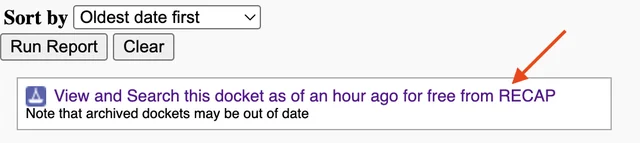
(Be careful! This extension is generally excellent, but it also adds buttons that let you automatically upload things that you view to the RECAP archive. This is usually fine, because sealed filings cannot be accessed through PACER, but you still need to be careful not to upload any inadvertently-filed confidential documents.)
If you enjoyed this post, consider subscribing to receive free e-mail updates about new posts.